
One click.Clipboard to QR.Fully offline.
Generate a QR code from anything you just copied — a URL, a Wi-Fi password, a phone number. Decode QR screenshots straight from your clipboard. The extension itself makes zero network calls.
- Latency
- < 80 ms
- quick mode
- Network
- 0 req
- ever · generation
- Languages
- 8
- UI · auto-detect
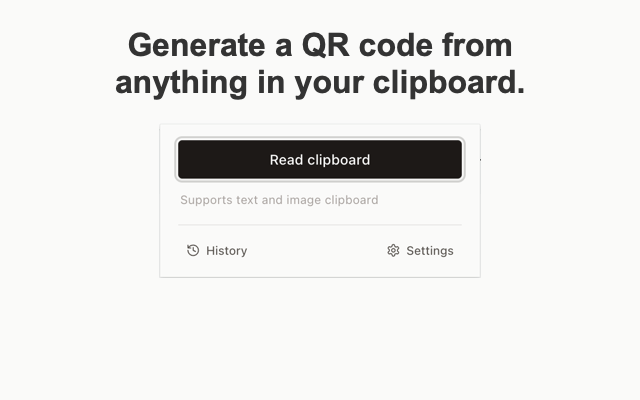
ClipQR popup · Quick mode · 320 px
Everything you need to handle QR codes
Two click-to-copy modes, image padding, regex-driven padding label, optional center logo, regex replacement rules, decode from images, 30-entry history — all on your device.
Quick mode
Click the toolbar icon, click the button. The extension reads your clipboard (text or image), runs any regex replacement rules you've configured, renders a 512×512 PNG with optional center logo, and copies the PNG straight back to your clipboard. A system notification confirms success.
Normal mode
Open the popup, paste or type your text into the auto-growing textarea, click Generate. The QR appears in the popup at 220×220 px. Click 复制 to copy the PNG.
Image padding
Add configurable whitespace around the QR matrix — None / Small / Medium / Large — so the rendered PNG has breathing room for layouts, print, or composition with other graphics. The QR matrix shrinks to fit; error correction stays high so scannability is unaffected.
Padding label
Render a short label (for example, the domain of a URL) inside the padding band, extracted from your text by a regex rule. Pick any of the six anchor positions: top-left, top-center, top-right, bottom-left, bottom-center, bottom-right. First matching rule wins; padding = None disables the label so you don't get overlapping text.
Center logo
Drop a PNG / JPG / WebP (≤ 1 MB) into Options. The slider sets logo size 10%–30%. Error correction is bumped to Level H so the code stays scannable with a logo on top.
Replacement rules
Define ordered regex → replacement pairs. The first matching rule wins; others are skipped. Per-rule toggles: enabled, global (replace all matches), and "apply after decoding" for QR-from-image workflows. Common uses: CDN domain swap, tracking-parameter strip, phone-number normalisation.
Decode QR from clipboard image
Screenshot a QR code → copy the image → click Quick mode. jsQR decodes the content, replacement rules run, the decoded text is written to your clipboard. No more typing long URLs from a phone screenshot.
30-entry history
Every generated or decoded text is logged with a relative timestamp, a kind badge (`Generated` / `Decoded`), and two buttons: copy text, or regenerate and copy the QR. Stored only in chrome.storage.local.
Multilingual
8 built-in UI languages: English, 简体中文, 繁體中文, 日本語, 한국어, Español, Français, Deutsch. Auto-detects browser language on first run; switch any time in Options — all three pages update instantly.
Privacy
All processing happens on your device. Configurations, logo, and history live in `chrome.storage.local`. No network requests, no analytics, no telemetry. The extension never sends your clipboard contents anywhere.
How quick mode works
Three steps from clipboard to scannable image.
- 10 ms
Click the toolbar icon
Open the popup in quick mode. The icon adapts to match the toolbar color.
- 2≈ 12 ms
Clipboard is read automatically
If it contains text, regex rules run and a 512×512 PNG is rendered (with optional center logo). If it contains a QR screenshot, jsQR decodes it and writes the text back.
- 3≈ 80 ms
PNG copied back, ✓ shown briefly
A system notification confirms success. The toolbar icon briefly shows a green check.
Privacy by default
All processing happens on your device. We don't operate a server. The extension never sends your clipboard contents anywhere.
| Dimension | Value | Verdict |
|---|---|---|
| Network requests during QR generation | 0 | none |
| Telemetry / analytics / crash reports | 0 | none |
| User accounts / sign-up | 0 | none |
| Cloud sync / remote backup | 0 | none |
| Clipboard history sent anywhere | 0 | none |
- No network requests for QR generation or decoding.
- The extension ships zero analytics, zero telemetry, and zero crash reporting.
- This marketing website uses Google Analytics to measure traffic — it does not see your clipboard.
- Configurations, logo, and history live only in chrome.storage.local.
- Permissions are the minimum required: clipboardRead, clipboardWrite, storage, notifications.
Permissions, explained
Every permission in the manifest has a single purpose. Nothing is requested that the core feature does not need.
01{02 "manifest_version": 3,03 "name": "ClipQR",04 "version": "0.1.0",05 "permissions": [06 "clipboardRead",07 "clipboardWrite",08 "storage",09 "notifications"10 ],11 "host_permissions": [],12 "content_security_policy": {13 "extension_pages": "script-src 'self'; object-src 'self'"14 }15}clipboardReadRead the text or image you just copied in quick mode.
clipboardWriteWrite the rendered PNG (or decoded text) back to your clipboard.
storageKeep your config, replacement rules, center logo, and 30-entry history locally.
notificationsShow a system notification confirming quick-mode success.
host_permissionsNot requested. ClipQR runs entirely on the chrome-extension:// origin.
8 built-in UI languages
Auto-detected on first run. Switch any time from the Options page — popup, options, and history update instantly.
Frequently asked questions
Quick answers about privacy, capabilities, and how ClipQR compares to online QR generators.
The extension itself does not — all processing happens locally in your browser. The extension has no network requests for QR generation or decoding, no analytics, and no telemetry. Your clipboard contents never leave your device. (This marketing website uses Google Analytics to measure traffic — see Privacy.)
Yes. Open Options, drop a PNG, JPG, or WebP file (≤ 1 MB), and use the slider to set the logo size between 10% and 30%. Error correction is automatically raised to level H so the code stays scannable with a logo on top.
Yes. Copy a QR screenshot, then trigger quick mode. ClipQR runs jsQR on the image, applies your replacement rules if any, and writes the decoded text back to your clipboard. The QR is not required to be upright — small skew is tolerated.
Ordered regex → replacement pairs. The first matching rule wins. Common uses: swapping CDN domains, stripping tracking parameters, normalising phone numbers. Each rule has three toggles: enabled, global (replace all matches), and apply-after-decoding for QR-from-image workflows.
Image padding adds configurable whitespace (None / Small / Medium / Large) around the matrix, useful when the QR will sit next to other graphics or be printed small. The padding label renders a short text — say, the domain of a URL — inside that band, extracted from your encoded text by a separate regex rule. Pick any of six anchor positions: top-left, top-center, top-right, bottom-left, bottom-center, bottom-right. First matching label rule wins; padding = None automatically disables the label.
The current release targets Chromium-based browsers (Chrome, Edge, Brave, Arc, Opera) because it uses Manifest V3 and the offscreen canvas API. Firefox support is on the roadmap.
Online generators receive the text you paste, render the QR on their server, and may log your IP and the encoded content. ClipQR never touches the network. You also get features online generators don't offer: regex replacement, clipboard-image decoding, and a local 30-entry history.
Up to 30 entries of generated or decoded text. Stored only in chrome.storage.local on your device. Each entry shows a relative timestamp, a Generated/Decoded badge, and two buttons: copy text, or regenerate-and-copy the QR.